


Download TikTok Notes Without Watermark
Save TikTok Notes (photo posts) in HD quality without TikTok watermark. Paste the link and download.

TikTok Notes are TikTok’s photo and text post types.Creators display images, carousels and short visual pieces. With SnapTik, you have the possibility to download TikTok Notes without watermark and keep them on your device.
Paste any TikTok Notes URL inside the box above and press Download. SnapTik gets the content and gives you options for saving as video or without watermark. No login or account is needed.
Our TikTok Notes downloader functions inside browser for Android, iPhone and desktop. You are allowed to download as many Notes as you decide, in HD quality, with no watermark at all, for free.
If you wish to keep a favorite Note, send it somewhere else or store content without TikTok logo, SnapTik helps you do that easily. You only copy the link, paste it here and just download.
How to download
TikTok Notes without watermark
 Open TikTok and find the Note you want to save
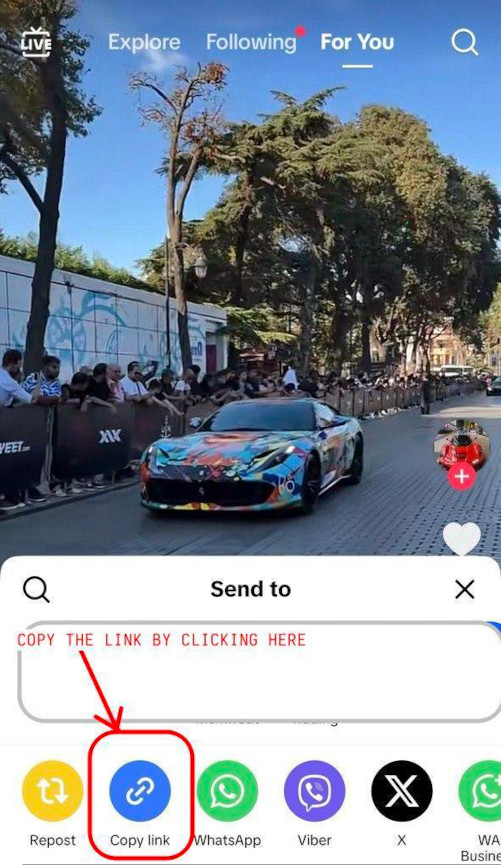
 Tap Share and copy the link to the Note
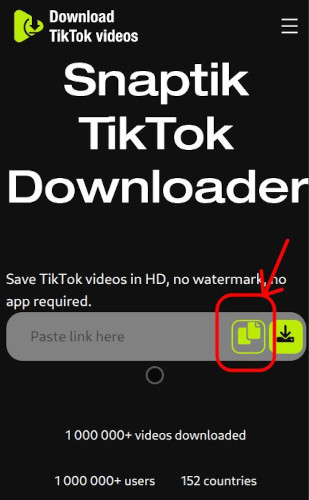
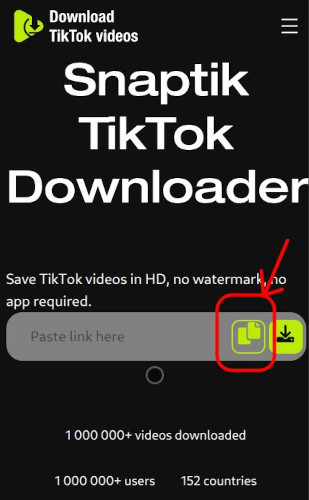
 Paste the link into the SnapTik box above
 Click Download and wait for the result
 Pick Download video, Download music or the option Without watermark
 Your file saves onto the device. There is no watermark or login.
 Same actions on phone or desktop, SnapTik works everywhere.
Copy the TikTok Notes link using Share, paste it here, push Download. SnapTik processes the file and gives you choices for download.
Pick "Without watermark" to receive a clean file.You can store video or audio on your device for yourself.
There is no app or account required. SnapTik can be used in browser from any device.
Key features of our
TikTok Notes downloader


Benefits of downloading
TikTok Notes with SnapTik
How to download TikTok videos
You have to start TikTok app to manage downloading videos without watermarks using Android.
Click the button for sharing. You will see 'Share' button, is arrow on right when you open video.Select 'Copy Link' from there.
After this, copy the TikTok URL, put in our downloader place, click ‘Download’ and then the video will be on your device and free from logo and watermark.
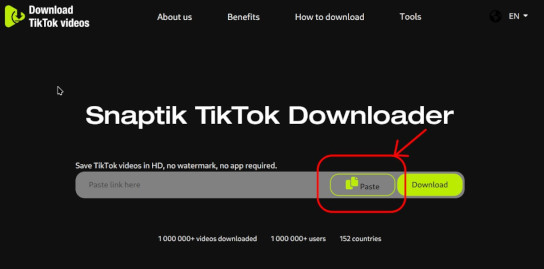
Our method is quite helpful, and almost every device and everywhere you want. You get TikTok video downloaded straight to a PC or desktop, never with mark or extra logo.
This downloading method works not only on Windows; Linux and Mac systems can run it as well. On your PC, you only use the browser and do not do program installs.
For Windows you get it on 7, on 8, on 10, all works. Mac computers operate the same.
It is a bit easy. Copy and insert the TikTok video link, drop it in the app. Just click “Download” and your video is automatically there on your PC without any annoying watermark from TikTok.
Apple iPhone users are also served with our download solution. On their Apple gadgets, people get every TikTok clip without watermark in just short time and no cost.
A thing to say is that you will require Documents by Readdle app installed in your device, because in newer Apple security, direct downloading TikTok videos for iOS 12 devices and further versions is not possible.
You may just copy the TikTok link and run Documents by Readdle. Start your download.
This way is simple. Install Documents by Readdle, open the browser inside it, paste our tool link.
After you copy and input the link in the box, just tap “Download” to begin, and the TikTok video will be on your device without watermark, high definition.
Frequently Asked Questions
-

What are TikTok Notes?
TikTok Notes is TikTok’s way of posting photos and texts. Creators distribute images, carousels and short visual posts. SnapTik lets you get these Notes without TikTok watermark. -
Can I download TikTok Notes without the watermark?
Yes, you can use SnapTik to download TikTok Notes without any TikTok watermark. After you paste the link, select the "Without watermark" option for a file without the mark. -
Do I need a TikTok account to download Notes?
No, you just need the TikTok Note link.Paste it on SnapTik and you can download it. No need for login or TikTok account. -
Is it free to download TikTok Notes with SnapTik?
SnapTik is free. Download any TikTok Notes in HD and without watermark. You do not have to pay a thing. -
Does it work on mobile and desktop?
SnapTik runs in your browser for Android, iPhone, and desktop. Just paste the TikTok Notes link and download.You do not need to install the app.