


Download TikTok Story Without Watermark
Keep Stories always in your phone memory. It is free and you do not need to sign in.

TikTok Stories are just short video posts but they will show for just 24 hours. Once expired they will not be there unless you choose to download and keep. SnapTik is one free browser-based option enables Stories to download without watermark left on the video.
The only thing is the link from TikTok Story. Paste this link into the box, click SnapTik, and it will grab the Story video, letting you select download in HD, as audio only or as version without the TikTok mark.
Some users want to save others’ Stories, store useful short videos or make backup content before they are gone. The Story download option works inside your browser and for any device, so there is never needed download of another software.
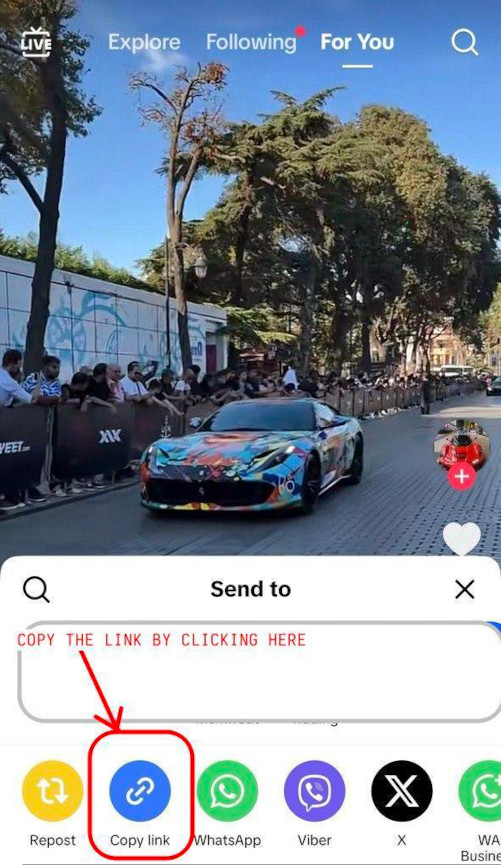
How to save TikTok Story
without watermark
 Just go into TikTok, search which Story you want to keep
 Tap the share button on the Story
 Choose "Copy link" to copy the Story URL
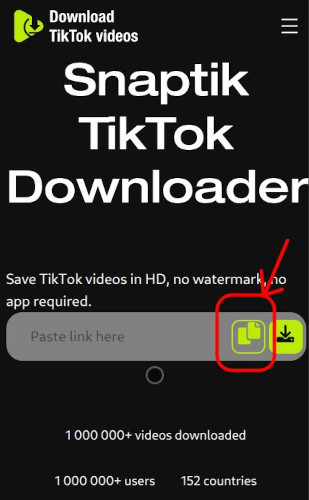
 Paste the link in the upper box on this web page
 Click the download button
 Pick a saved style (as video, as music, or clearly watermark removed)
 The Story from TikTok will save in good quality onto your gadget
SnapTik brings an easy way to save TikTok Stories and you do not have to register or login—paste and take.
Each Story downloaded will be in HD and without watermark, making your saved copy nice for re-use or when giving to friends.
You can use our system from mobile phone, desktop, or a tablet device. Use any browser, you never add new apps.
Key features of our
TikTok Story downloader


Benefits of saving
TikTok Stories with SnapTik
How to download TikTok videos
You have to start TikTok app to manage downloading videos without watermarks using Android.
Click the button for sharing. You will see 'Share' button, is arrow on right when you open video.Select 'Copy Link' from there.
After this, copy the TikTok URL, put in our downloader place, click ‘Download’ and then the video will be on your device and free from logo and watermark.
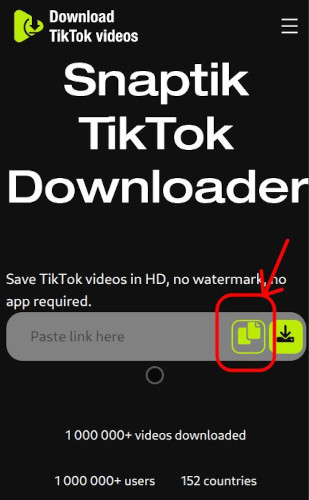
Our method is quite helpful, and almost every device and everywhere you want. You get TikTok video downloaded straight to a PC or desktop, never with mark or extra logo.
This downloading method works not only on Windows; Linux and Mac systems can run it as well. On your PC, you only use the browser and do not do program installs.
For Windows you get it on 7, on 8, on 10, all works. Mac computers operate the same.
It is a bit easy. Copy and insert the TikTok video link, drop it in the app. Just click “Download” and your video is automatically there on your PC without any annoying watermark from TikTok.
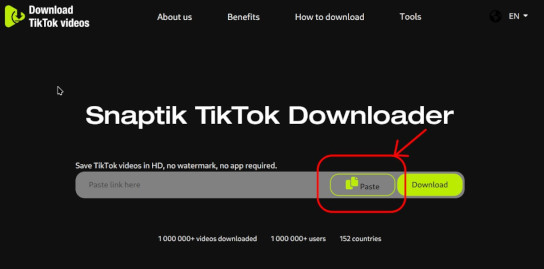
Apple iPhone users are also served with our download solution. On their Apple gadgets, people get every TikTok clip without watermark in just short time and no cost.
A thing to say is that you will require Documents by Readdle app installed in your device, because in newer Apple security, direct downloading TikTok videos for iOS 12 devices and further versions is not possible.
You may just copy the TikTok link and run Documents by Readdle. Start your download.
This way is simple. Install Documents by Readdle, open the browser inside it, paste our tool link.
After you copy and input the link in the box, just tap “Download” to begin, and the TikTok video will be on your device without watermark, high definition.
Frequently Asked Questions
-

What is a TikTok Story?
A TikTok Story acts as tiny video that will show just to your followers for one day before disappearing. It is temporary and cannot be recovered, unless using SnapTik or some such tool to keep it. -
How can I download a TikTok Story so there is no watermark?
Yes, you can have TikTok Stories downloaded and without watermark, if using SnapTik. Pick the “Without watermark” choice after inserting the Story link, and a tidy video will be ready. -
Do I need a TikTok account to download Stories?
No need to create login. Only the link is all you require in SnapTik, then download video—no TikTok profile at all needed. -
Why would I save a TikTok Story?
A Story will be gone in just 24 hours. Some users wish to keep a helpful video, a favorite memory or even their own Story before lost. SnapTik helps for permanent copy that is free from forced watermark. -
Is SnapTik free when I need it for TikTok Stories?
It is always free, SnapTik. Users may download TikTok Stories in both HD and with watermark removed.