


Download TikTok Slideshow Without Watermark
Save TikTok image slideshows and video carousels in high definition. Put your the link above and you are able to download with no watermark on it.

An TikTok slideshow is a kind of video made from several photos or images, commonly with music or other effects. It is not a single video but a series of pictures played in sequence. SnapTik is a free tool online you can use to download TikTok slideshows without watermark.
You only need the slideshow link from TikTok.Paste it in the box above and SnapTik retrieves the video for you with choices for downloading HD, audio or without TikTok watermark.
If you need to save creator’s slideshow, keep tutorials or store your own posts, our slideshow downloader can be used in browser from any device. No other software has to be set up.
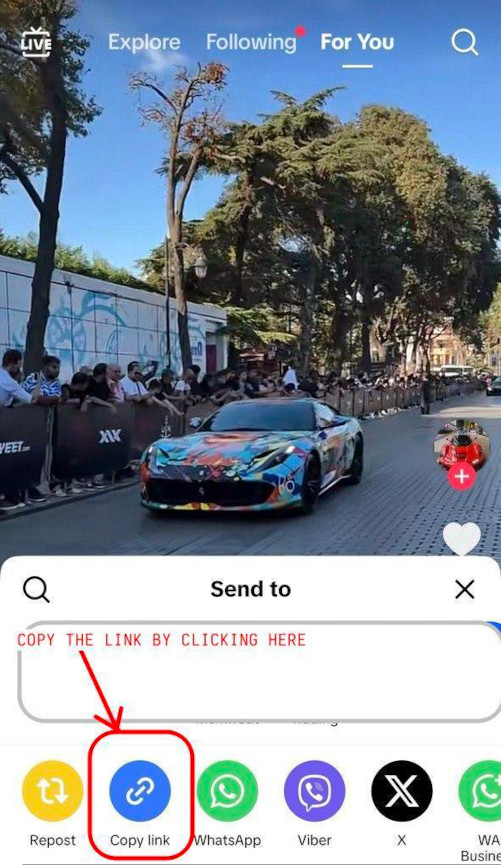
How to save a TikTok slideshow
without watermark
 Just open TikTok and search for whatever slideshow is what you want for saving.
 Tap the share button on the slideshow
 Choose "Copy link" to copy the slideshow URL
 Copy and place the URL link into the box which you can see at the leading place of this webpage.
 Click the download button
 Afterward, you can pick a format that you want, like a video or music or just one with no watermark.
 Your TikTok slideshow gets downloaded to your smartphone or computer with a high quality.
SnapTik is designed for slideshows to be simply saved from the TikTok. Logging into an account is not needed—you only paste your link and hit the option to download.
With our tool, slideshows downloaded can be HD, and there will not be a TikTok watermark.So, you get a tidy version to keep for yourself or if you want to share.
You have the ability to use these features from your smartphone, your tablet or any computer device. It can function on all modern browsers; you will not have to install anything.
Key features of our
TikTok slideshow downloader


Benefits of saving
TikTok slideshows with SnapTik
How to download TikTok videos
You have to start TikTok app to manage downloading videos without watermarks using Android.
Click the button for sharing. You will see 'Share' button, is arrow on right when you open video.Select 'Copy Link' from there.
After this, copy the TikTok URL, put in our downloader place, click ‘Download’ and then the video will be on your device and free from logo and watermark.
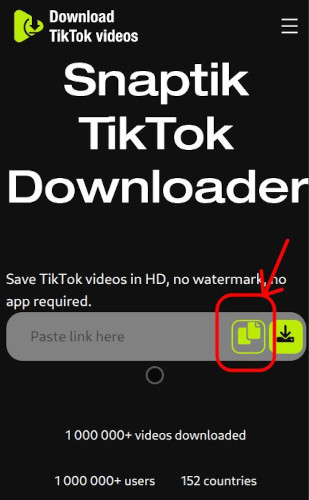
Our method is quite helpful, and almost every device and everywhere you want. You get TikTok video downloaded straight to a PC or desktop, never with mark or extra logo.
This downloading method works not only on Windows; Linux and Mac systems can run it as well. On your PC, you only use the browser and do not do program installs.
For Windows you get it on 7, on 8, on 10, all works. Mac computers operate the same.
It is a bit easy. Copy and insert the TikTok video link, drop it in the app. Just click “Download” and your video is automatically there on your PC without any annoying watermark from TikTok.
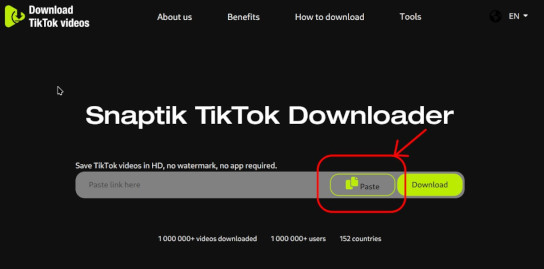
Apple iPhone users are also served with our download solution. On their Apple gadgets, people get every TikTok clip without watermark in just short time and no cost.
A thing to say is that you will require Documents by Readdle app installed in your device, because in newer Apple security, direct downloading TikTok videos for iOS 12 devices and further versions is not possible.
You may just copy the TikTok link and run Documents by Readdle. Start your download.
This way is simple. Install Documents by Readdle, open the browser inside it, paste our tool link.
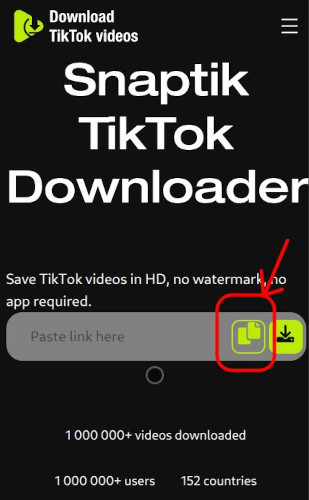
After you copy and input the link in the box, just tap “Download” to begin, and the TikTok video will be on your device without watermark, high definition.
Frequently Asked Questions
-

What is a TikTok slideshow?
An TikTok slideshow is a video made using multiple pictures or images and may contain music or effects. It plays as a series of images, instead of a single video. You can use SnapTik to download slideshows without TikTok watermark. -
Can you download TikTok slideshows without watermark?
Yes. SnapTik lets you download TikTok slideshows without TikTok watermark. Choose "Without watermark" when pasting slideshow link to receive a video file with no watermark. -
Do I need a TikTok account to download slideshows?
No. The slideshow link is enough for SnapTik. Paste it and download the video no login or TikTok account at all. -
Why would I save a TikTok slideshow?
Sometimes you want to save a tutorial, a memorable slideshow made by creator or your content. SnapTik allows you to have a permanent file without watermark, for either yourself or sharing. -
Is it free to get TikTok slideshows on a SnapTik?
Yes. SnapTik usage is free. You can download as much TikTok slideshow as you wish, HD, and without watermark.